Redesign
Video Upload in Greece's Largest Marketplace App
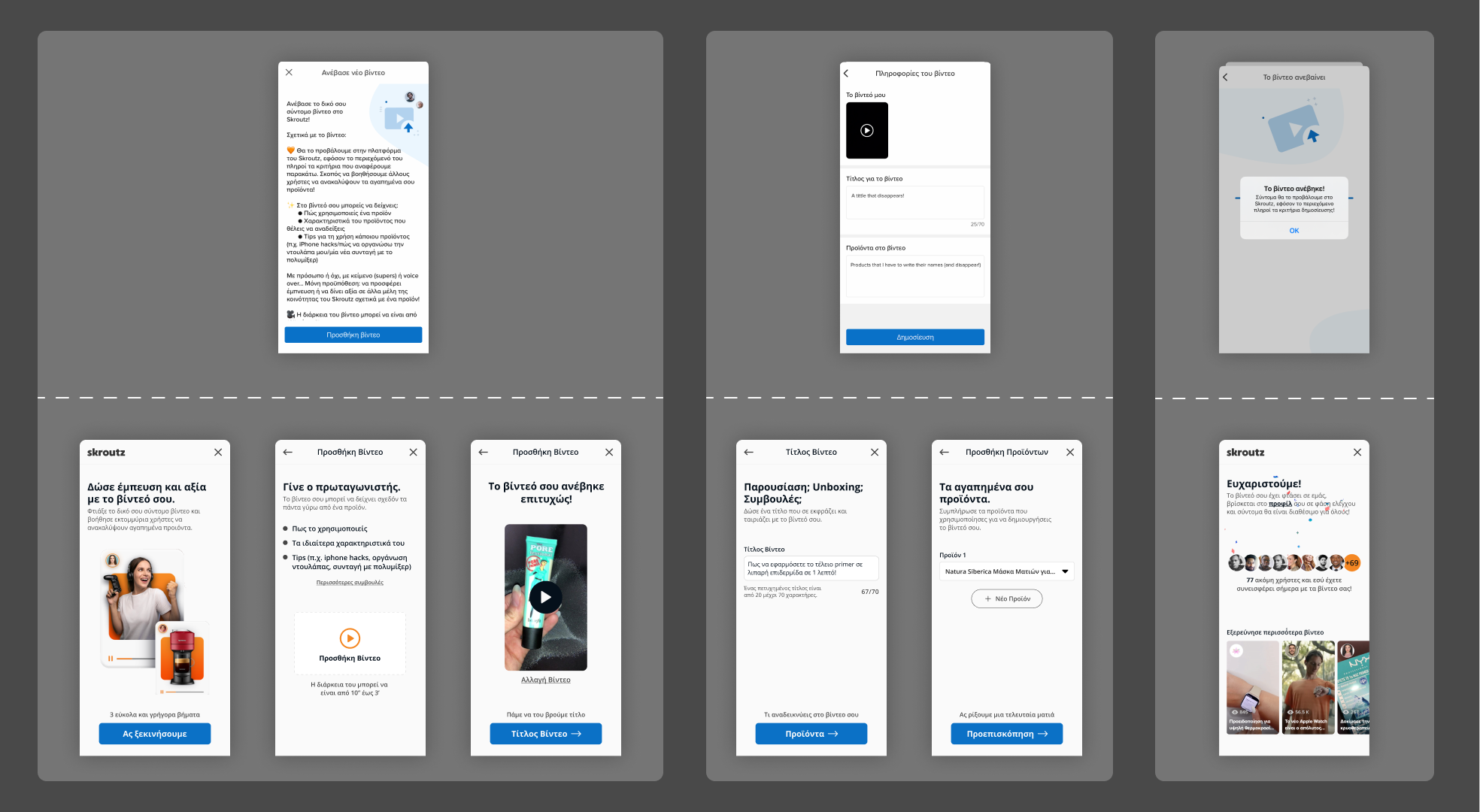
Briefly
In the digital world of Greece's largest marketplace app, the video upload feature is more than just a tool—it's the gateway for users to showcase and share their experiences. Recognizing the potential to enrich this feature, I embarked on a journey to combine psychology with user experience (UX) design, aiming to transform user interactions into engaging stories.
The Problem?
The initial design of the video upload feature lack of user-friendliness and intuitiveness. Users expressed frustration over the cognitive overload and the cumbersome process. This challenge was not just about enhancing a feature; it was about rethinking the user's journey to foster a connection and loyalty to the platform.
The Answer
I strongly believe that the journey begins in the human brain. In the redesign of the video upload feature for Greece’s largest marketplace app, psychology was the catalyst for transformation. The goal was to not only boost functionality but also to enhance user satisfaction and engagement.
Through surveys and user interviews, pain points and critical insights revealed. Users sought simplicity, efficiency, and an element of personal touch. The psychological aspects of user engagement, such as reducing cognitive load and creating a narrative journey, became the cornerstone of the redesign strategy.
The redesign journey started with rough sketches that gradually evolved into detailed wireframes. The goal was to not only boost functionality but also to enhance user satisfaction and engagement. Key implementations included:

1. Reduce
Cognitive Load

2. Progressive Disclosure

3. Aesthetic Effect
Note: This UX redesign was a personal endeavor and exploration, and was not commissioned by the company. The insights and designs are my own interpretations and do not reflect the official views or future plans of the company.
Old Design: Glimpsing the pain points
Even in our favorite apps, some elements just feel… off, don’t they? Taking a closer look at the image below that illustrating the two screens from the app’s video upload feature, might stir thoughts like:
When I was uploading the video, the text just seemed never-ending. It was so discouraging...
 Stavroula, Video Blooger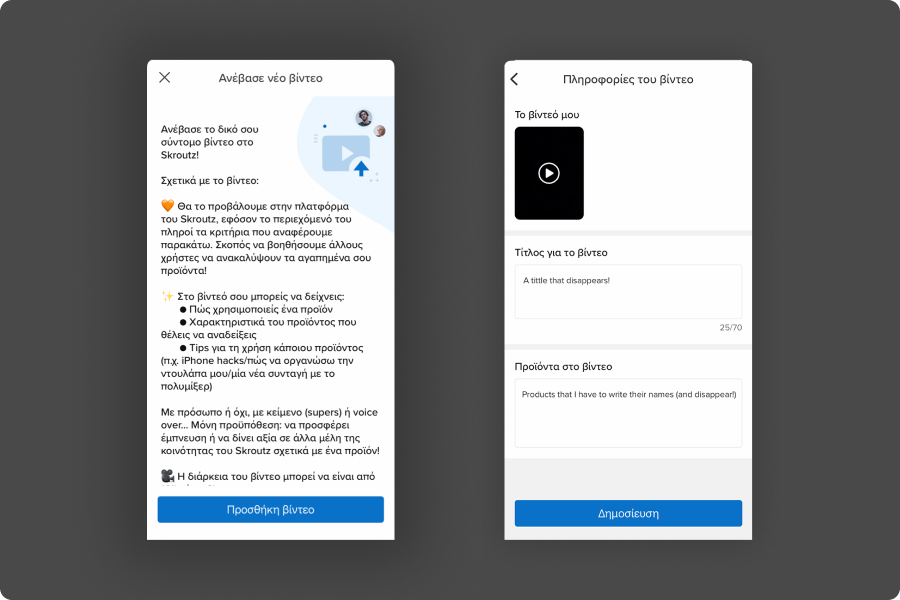
Old Design: Screen 1. 120 words of Instructions - Screen 2. Video Thumb, Title, Products
Note: The text in the images is in Greek. I apologize for any inconvenience and appreciate your understanding as we dive into this UX exploration.
My observations, backed by user testing, highlighted the following issues, remembering that UX design extends far beyond shapes and colors — IT BEGINS IN THE HUMAN BRAIN.
Screen 1: Overwhelmed by words
Screen 2: Navigational and feedback issues
Redesign: Navigating Step by Step
The main goal? Break the process down into smaller, easy-to-digest steps and say goodbye to long blocks of text. Our brains prefer to handle information in small bits. With our constant interaction with screens, it’s evident that users are more inclined to engage with additional clicks rather than traversing through a 120-word textual labyrinth.
Welcome screen: A warm welcome
By substituting a bulky text with a succinct header and subheader and vibrant video blocks, we didn’t merely lighten the cognitive load. We transformed an information transaction into a warm, inviting visual conversation, subtly assuring users that the journey ahead is both valuable and doable.
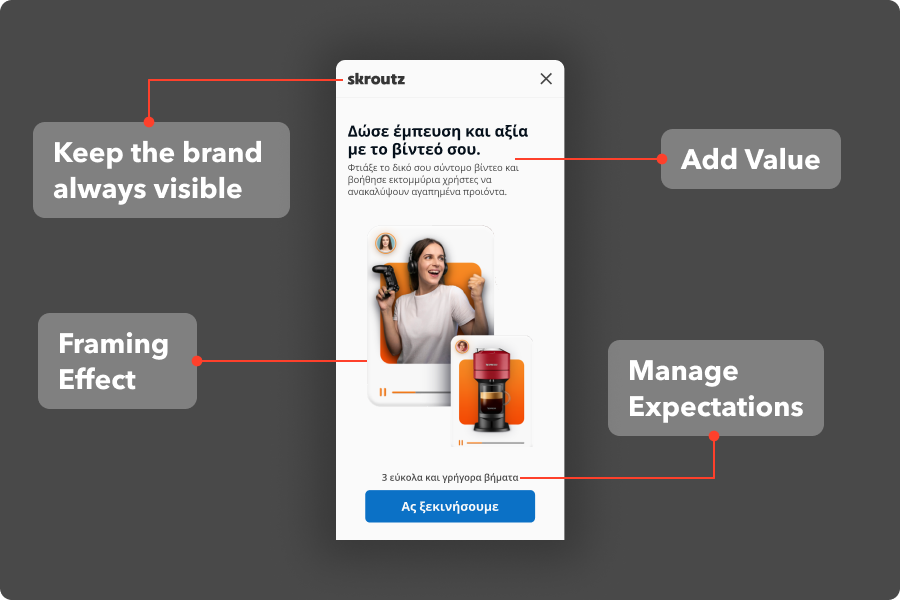
New Design — Welcome Screen
The revamped initiation screen eradicated the text wall, replacing it with:
Catchy header & subheader
Concise yet informative, effectively minimizing cognitive load and immediately clarifying the journey ahead.
Visual appeal
Presenting an inviting atmosphere with video blocks, engaging users visually, and creating an inclusive feel.
Clear CTA
A reassuring “Let’s Start” button accompanied by a calming “3 easy and fast steps” message.
Select video screen: Streamlining the upload.
Simplicity and encouragement were spotlighted in Select Video Screen 2. With ‘Be the Star’ as a motivational title, we didn’t just offer a directive but encapsulated a positive, subtle nudge towards content creation, acknowledging the user’s role and efforts.
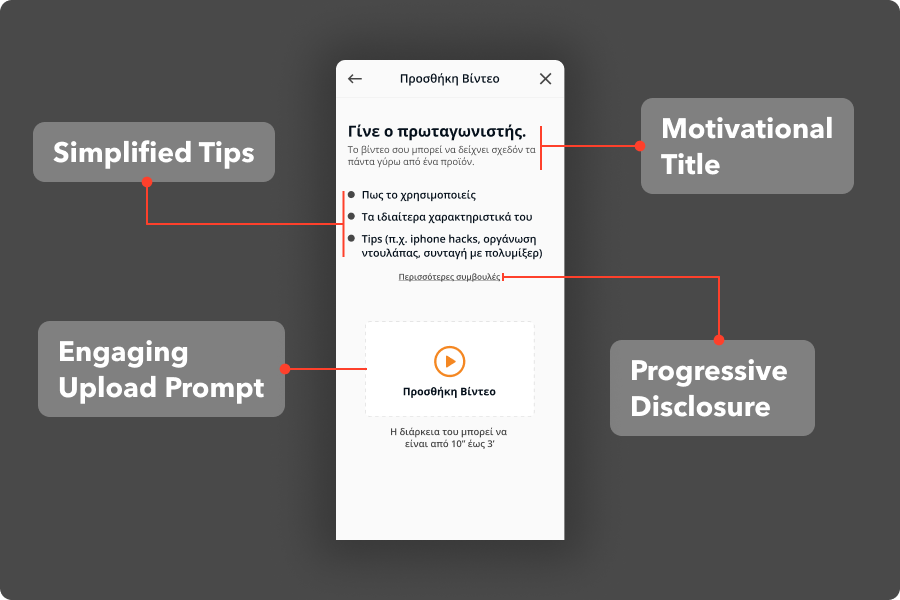
New Design — Select Video Screen
So a second screen created that offers:
User-Friendly guidance
Simplified tips, free from overwhelming detail, set a comfortable pace and direction.
Progress animation
An engaging upload progress visual transforms passive waiting into a dynamic, interactive moment.
In addition the below microinteraction was strategically implemented to eliminate the uncertainty of user that the video has been uploaded successfully.
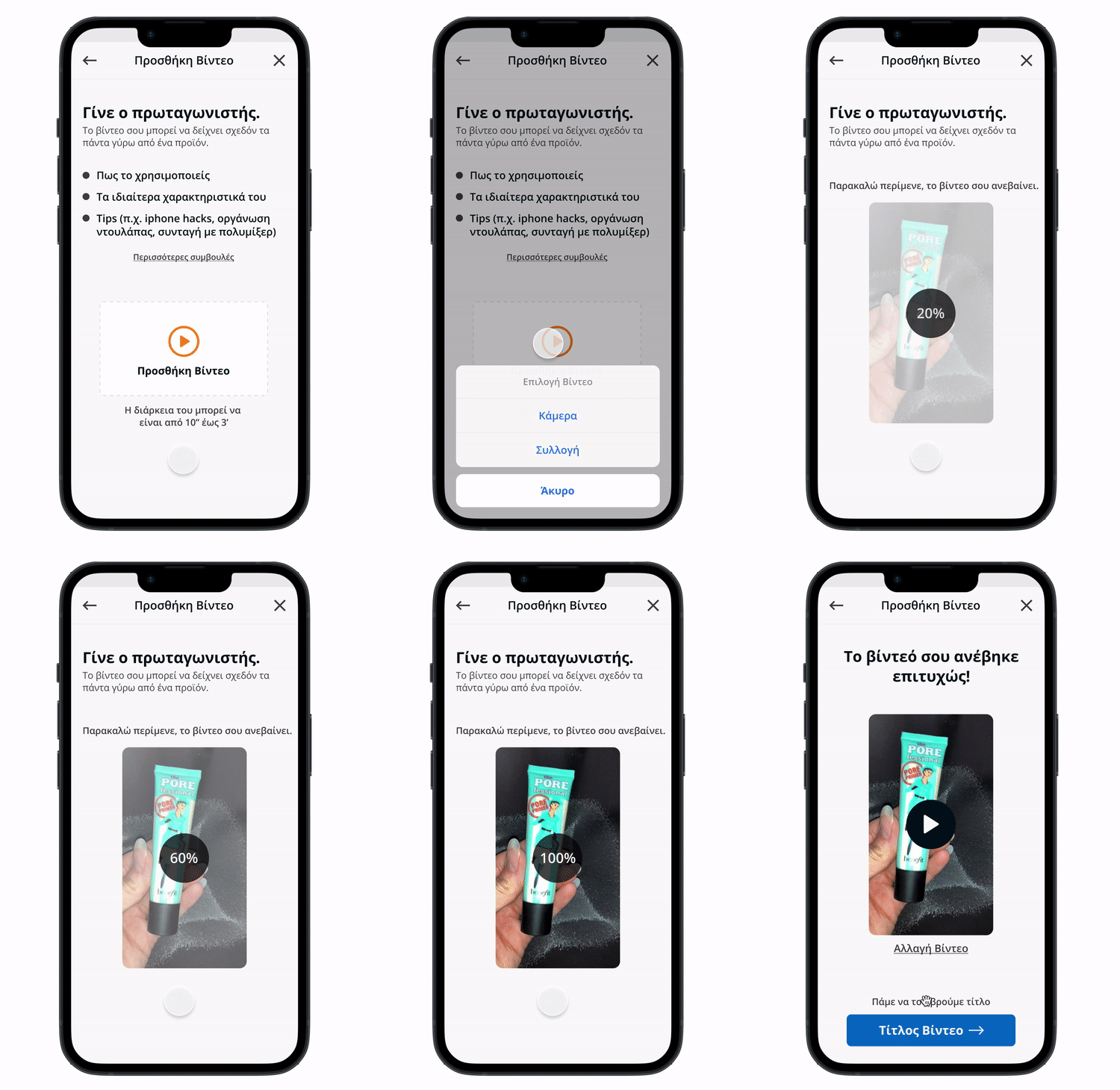
New Design — Uploading the Video
Add Title screen: Supportive creation environment
The redesign continued with Title screen on a user-friendly rhytm and structured guidance to empower users though coherent and light task load.
Guided Input doesn’t just mitigate user error but acts as a gentle hand guiding them through the creation process, sparing them from second-guessing their input and fostering a stress-free interaction.
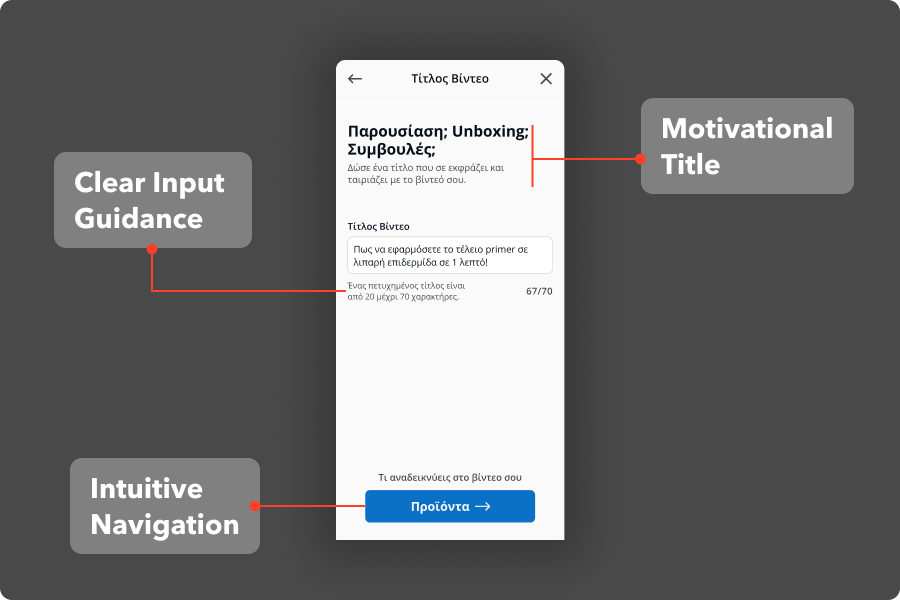
New Design — Title Screen
The revamped Title screen eradicated the text wall, replacing it with:
Guided Input
Suggestions on title length and format prevent user frustration stemming from ambiguous requirements.
Clear CTA
Intuitive navigation through the creation steps enhances user control and clarity.
Add products screen: Effortless product tagging
Introducing a Dropdown for Products wasn’t merely about streamlining a process. It was an intentional step to wrap the users in a cocoon of convenience, safeguarding their time and cognitive energy, allowing them to allocate their attention where it truly matters: their creative content.
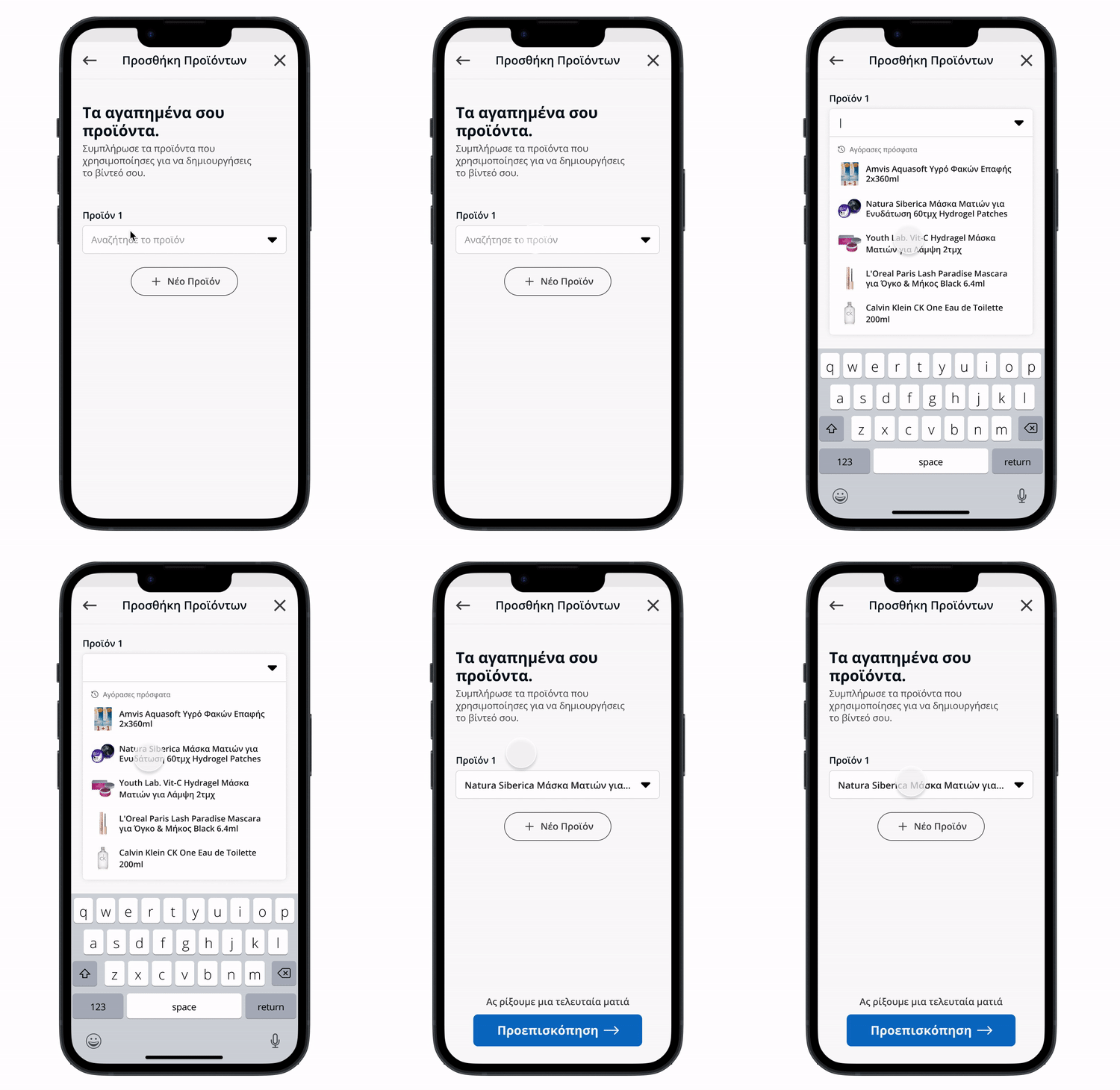
New Design — Adding Products highlighted in Video
The Key implementations in the redesiged Product screen were:
Dropdown for products
Replaces manual input or copy-pasting with a seamless, convenient selection process, respecting user time and effort.
Flexibility in adding products
An accommodating approach that values varied user needs and preferences.
Preview screen: Empowering with previews.
Affording users a Holistic Overview is not just a functional step, but an emotional cushion. It bestows upon them the power to review, refine, and reassure themselves, fostering a sense of control and confidence as they stand on the precipice of sharing their creation with the world.
Transparent publishing CTA: A smooth, comprehensible transition to sharing their creation.
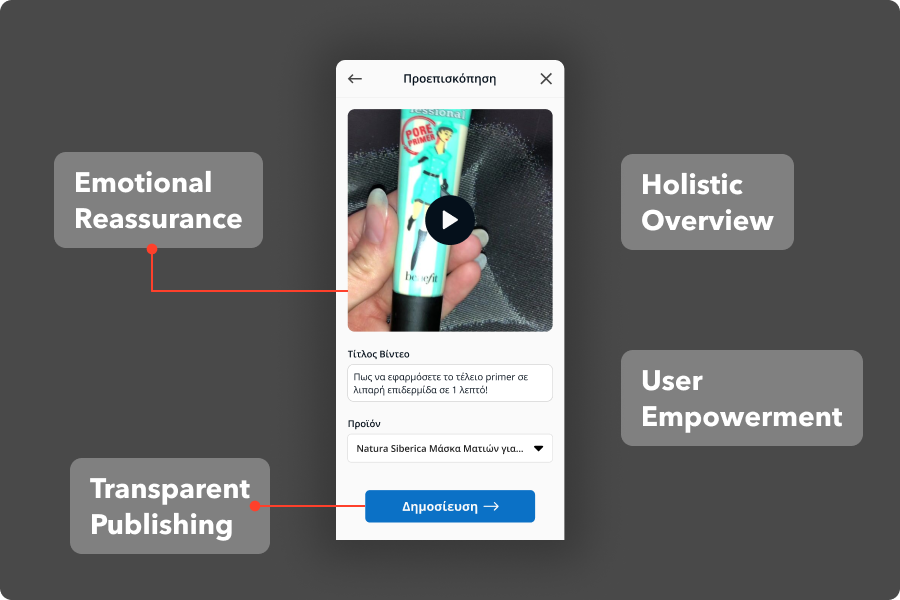
New Design — Preview Screen
Final success screen: Concluding with gratitude.
After publishing, we dedicate an entirely separate screen to thank users, inform them, show our gratitude, and provide additional information. The Thank You Screen seals the experience with positive reinforcement and necessary information.
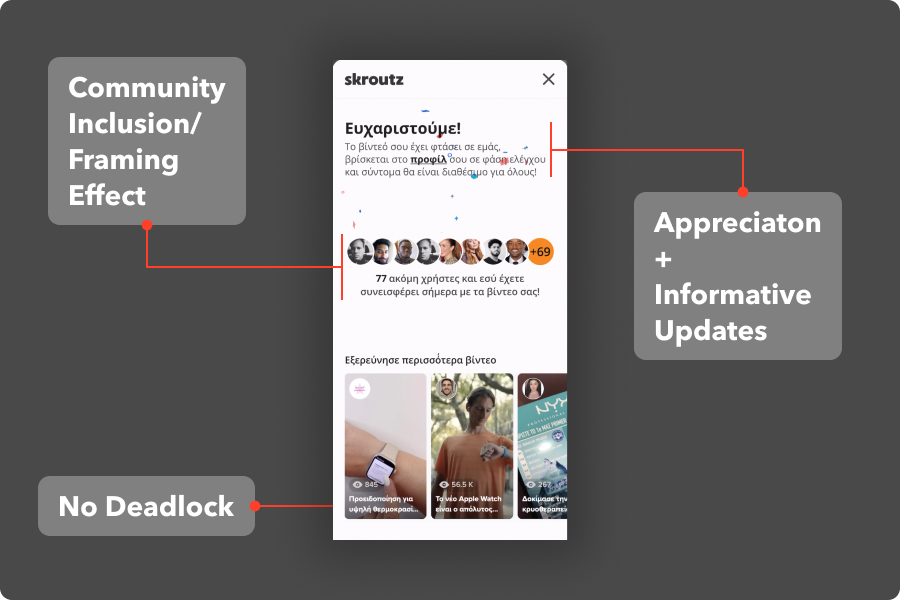
New Design — Final Success Screen
Thank You Message. It is more than a polite nod; it’s a vital acknowledgment that the user’s effort is seen, valued, and appreciated, building a positive association with the task and fortifying a harmonious user-brand relationship.
Clear status update. Informing about the video’s reviewing progress.
Contributors: Showing that more users upload their videos, users feel they belong to something bigger. Humans are social beings and want to be part of the community.
